note
課本第15章
ApacheSetup
在設定安全機制或是防火牆的時候,要先關閉伺服器
# 查看security linux有沒有設定,如果是premission就要使用下面的指令disable security linux
$ getenforce

# 暫時關閉
$ setenforce 0

# 永久關閉
$ vim /etc/selinux/config   # 設定: SELINUX = disabled
# 查看防火牆有沒有開
$ systemctl status firewalld
重要Apache目錄
/etc/httpd: 主要安裝目錄- conf.d是主要配置檔,cond也是配置檔,用兩個配置檔比較不會太亂
- logs是記錄檔(連結),對應到
/var/log/httpd,裡面會有紀錄內容
/var/log/httpd: 裡面會有網頁紀錄內容/var/www/html: 家目錄位置,可以html放在裡面/etc/httpd/conf/httpd.conf: apache 的主設定檔,所有和伺服器運作有關的設定值都放在這個文字檔中
centos7的環境和ubundu是不一樣的,如果是在ubundu,家目錄會在/usr/local/apache2/htdocs/下面
在/etc/httpd/conf.d裡面可以在網站中再架一個虛擬網站,就是下面的virtual host
virtual host
想要看程式碼可以看15周的: virtual host
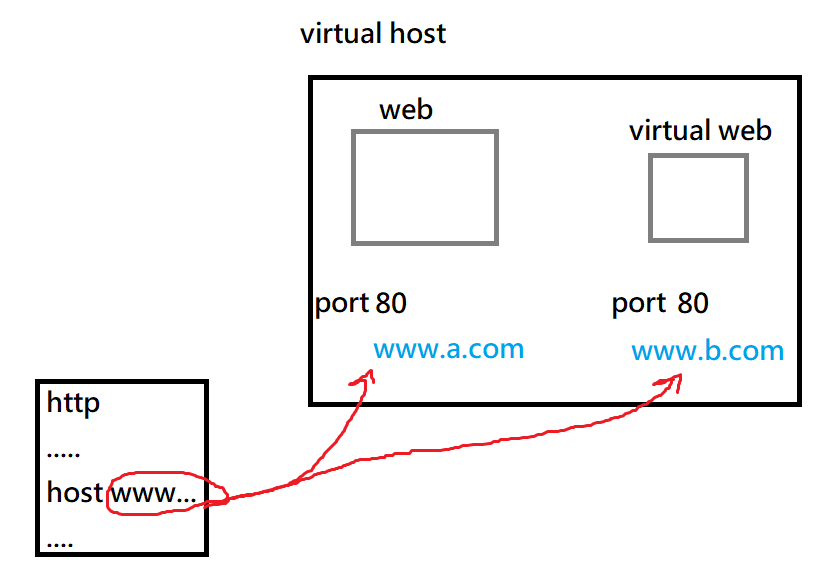
虛擬主機技術: 可以在同一個主機上,架設多個虛擬網站,網站共享IP,共享port,MAC也一樣
跟傳統的判斷三個條件(MAC、IP、port)傳送封包不一樣,這個技術會用到應用層的位置(application layer addr),稱作virtual host,會存在http裡面的host 位置,讓傳送封包時,可以不會不知道要傳到哪一個網站上。
附載均衡器 (load balancer; LB): 在一個網路裡面放很多台虛擬機,讓LB去接收使用者資訊,後根據IP跟TCP去轉發給後面的主機去處理,利用虛擬位置(virtual IP)連到不同的主機,會使用RR(round robin)演算法
LB就是一種cluster的架構,不過現在都是使用雲端docker的容器去處理
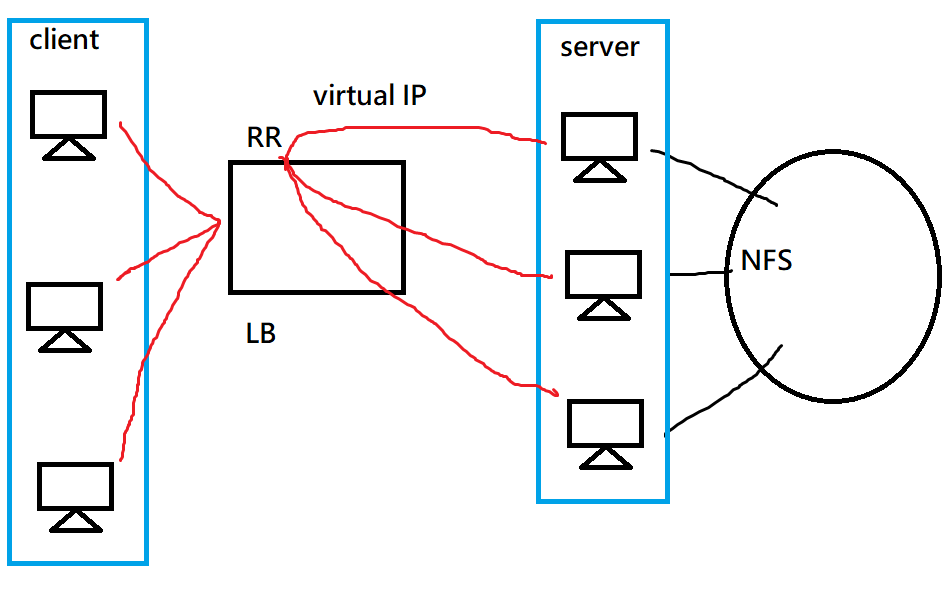
常見的附載均衡器軟體: hapwxy、nginx、LVS
httpd.conf
/etc/httpd/conf/httpd.conf
httpd的配置通常是使用 name+space+value
設定的根目錄
ServerRoot "etc/"
設定pid的位置,設定完後可以使用: ``cat /run/httpd.pid
查看httpd目前跑的process ID
這邊的run是直接在root創建
PidFile "/run/httpd.pid"
設定Listen
Listen 80 # Web port 位置
當收到客戶端要求後,如果在60秒未能正常提供回應資料時,則產生逾時訊息回應予客戶端。
Timeout 60
伺服器行程的限制: 如果沒有設定,就會使用預設
<IfModule prefork.c>
StartServer 8
MinSpareServer 5
MaxSpareServers 20
ServerLimit 256
MaxClients 256
MaxRequestsPerchild 4000
</IfModule>
StartServer: 控制開啟的行程數
MinSpareServer: 最小行程數
MaxSpareServers: 最大行程數
ServerLimit: 最多clinet 上限
MaxClients: 最多clinet 上限
MaxRequestsPerchild: 最多發送的請求
設定初始網站位置,預設是index.html
<IfModule dir module>
DirectoryIndex index.html index.php index.htm
</IfModule>
設定存放位置
DocumentRoot "/var/www/html"
設定配置檔案,讓一般使用者可以有自己的網頁(/etc/httpd/conf.d/userdir.conf)
<IfModule mod_userdir.c>
    #
    # UserDir is disabled by default since it can confirm the presence
    # of a username on the system (depending on home directory
    # permissions).
    #
    # UserDir disabled

    #
    # To enable requests to /~user/ to serve the user's public_html
    # directory, remove the "UserDir disabled" line above, and uncomment
    # the following line instead:
    #
    UserDir public_html
</IfModule>
建立的文件要和上面的名稱一樣 !!
$ mkdir /home/user/public_html
$ cd /home/user/public_html
$ echo "hi" > hi.htm
$ chmod 755 /home/user  # 讓使用者可以讀取,但不能寫入
使用者網站位置: ip/~user/hi.htm
網站位置連接
網頁不一定要放在網站下,可以放在隨機硬體位置
- 使用符號連結,讓網站可以使用mydata裡面的目錄
$ cd /var/www/html
$ ln -s /home/user/web/mydata mydata
- 使用Aliases做連結,在
/etc/httpd/conf/httpd.conf下加上Alias,並加上權限
Alias /mydata2 /home/user/web/mydata2
<Directory /home/user/web/mydata2>
  Require all granted
</Directory>
Linux指令
-
rpm -qa | grep httpd: 查看有沒有安裝httpd -
tail -f /var/log/httpd/access_log: f: follow 追蹤檔案,可以找到資料的後幾筆,可以用在察看訪問者訪問網站的 IP位置($1)、是否是跳轉進來的($2)、訪問時間($3)、協定($4)、錯誤代碼($5)、資源大小、客戶端使用瀏覽器…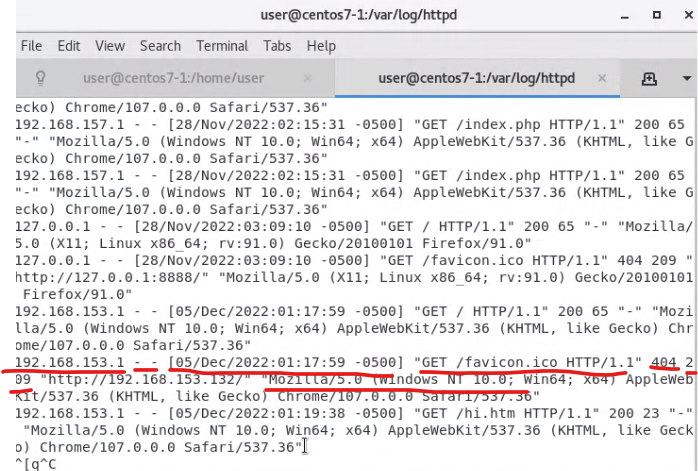
-
cat /var/log/httpd/access_log | awk '{print $1}' | sort | uniq | wc -l: 查看有多少IP訪問這個網站