note
charttr
linux高級檔案管理: https://blog.gtwang.org/linux/how-to-make-file-immutable-on-linux-chattr-command/
一般設定檔案權限,可以被root打破
這種高級屬性,可以預防root刪掉不可以刪掉的檔案
$ mkdir testdir; cd testdir
$ touch {a..d}
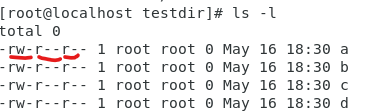
$ ls -l  # 查看屬性
$ cd ..
$ chmod u-w testdir/  # 拿掉創造者的w權限,讓他無法刪除資料夾,但是root一樣可以刪掉
$ lsattr
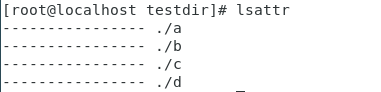
上圖代表所有資料夾都沒有檔案高級屬性
$ chattr +i a  # a文件加上 i lock,讓root不能修改新增刪除
$ chattr -i a  # 拿掉 i lock
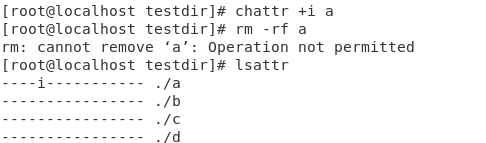
$ chattr +a a  # a 文件加上 a lock,讓root只能追加文字,適合伺服器的log檔
$ echo "123" >> a  # 可以追加文字,但無法使用vim編輯
$ chattr -a a  # 拿掉 i lock
如果要針對目錄需要加上 -R,目錄裡面所有文件就會有 chattr lock了
$ chattr +i -R testdir
ACL
access control list: https://ithelp.ithome.com.tw/articles/10221185
正常檔案權限只能有三種(owner, group, others 對應 read, write, execute),無法針對單一使用者做檔案權限的控制
$ dmesg | grep -i acl # -i不分大小寫 # 查詢系統支不支援ACL功能
id mary  # 直接顯示有沒有這個使用者

# 在腳本裡面的寫法
id mary > /dev/null 2>&1
echo $?  # 回傳0代表有這個使用者
$ useradd tom
$ useradd mary
查看ACL權限
$ getfacl a # get file acl
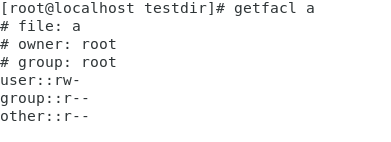
修改ACL權限
$ setfacl -m u:mary:rw a # -m代表修改權限,user: mary,添加可讀可寫權限
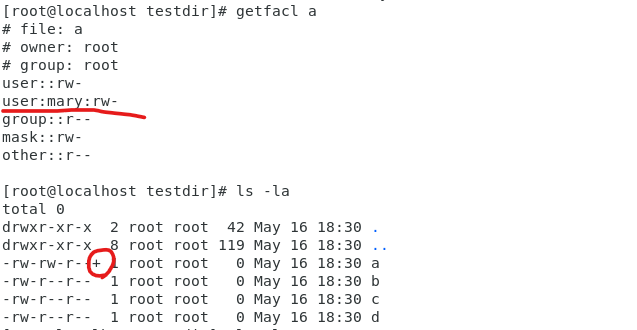
高級權限可以在 ls -l 裡面看到,會多一個+ㄎ
如果要針對群組設定,可以使用 g設定
$ setfacl -m g:test:wx a
也可以設定Mask,讓其他人無法設定超過Mask的權限
$ setfacl -m m:rx a
$ setfacl -m u:mary:rw a   # 最後只能拿到r
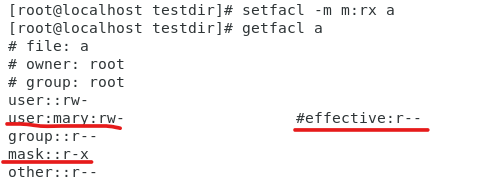
Ansible
基於SSH做管理和維護,可以對一群電腦進行控制
設立三台機器,且每台主機名稱都設定完成
no passwd login
$ hostnamectl set-hostname centos7-1
$ bash
設定ssh key (可以直接enter跳過選項)
$ ssh-keygen
$ vim /etc/hosts

這樣就可以使用host name 直接連線到SSH
$ ssh-copy-id root@centos7-2
$ ssh-copy-id root@centos7-3
ssh連線
$ ssh root@centos7-2
$ systemctl start sshd  # client, [centos7-2, centos7-3]
$ yum install ansible   # server, [centos7-1]
set up ansible hosts
$ vim /etc/ansible/hosts
伺服器通常是以功能或是作業系統去分類,這邊只有開兩台虛擬機,所以就簡單分兩類
[server1]
192.168.42.136  # centos7-2
[server2]
192.168.42.135  # centos7-3

[servers]
192.168.42.136
192.168.42.135
ansible 測試
$ ansible server1 -m ping  # -m代表module,這裡使用ping module
$ ansible servers -m ping
ansible test
ansible操作有兩種模式:
ad hoc: 簡單測試不同模組,上面就是使用這樣的方式
$ ansible servers -m shell -a "chdir=/var/log cmd'ls -l | grep log'"
playbook: 寫成腳本執行,真正使用的方式,通常使用YAML編寫
cmd: ls -l | grep log
chdir:/var/log
查看ansible支援模組有沒有sql
$ ansible-doc -l | grep -i mysql
$ ansible-doc ping  # 詳細說明ping模組
$ ansible-doc -s ping  # 簡單說明ping模組  -s == summary
遠端指令 command,command是default模組,所以也可以直接使用
$ ansible servers -m command -a "ifconfig"  # -a代表參數
$ ansible servers -a "ifconfig ens33"
並不是所有指令command都可以支援,如果使用像是 |、>…,在指令裡面,就會發生錯誤
command只能用在簡單的操作上面
所以要使用shell模組解決這個問題
$ ansible servers -m shell -a "ifconfig | grep -A 3 enp0s3"
$ ansible-doc -s shell  # 查看shell指令可以加入什麼參數
$ ansible servers -m shell -a "chdir=/tmp pwd"  # 使用參數改變目前資料夾位置  tmp