note
Ansible
測試ansible (ping module)
!!注意!! 重新啟動虛擬機如果是使用dhcp IP位置可能會不見,建議使用固定IP
也可以設定配置檔案,改成目前IPvim /etc/ansible/hosts、vim /etc/hosts
$ ansible servers -m ping
$ ansible servers --list-hosts
command module
查看目標開機多久
$ ansible servers -m command -a "uptime"
查看使用者是否存在
$ ansible servers -m command -a "id user"
shell module
使用管道,抓取匹配的字後5行 (查看前5行 (-B 5))
$ ansible servers -m shell -a "ifconfig | grep -A 5 enps33"
切換資料夾到tmp下,然後丟hi到a.txt
$ ansible-doc -s shell  # 查看shell指令可以加入什麼參數
$ ansible servers -m shell -a "chdir=/tmp cmd='echo hi>a.txt'"
$ ansible servers -m shell -a "echo hi > /tmp/a.txt"  # 跟上面是一樣的效果
create後面的檔案存在,後面的指令就不會被執行
$ ansible servers -m shell -a "chdir=/tmp create=/etc/passwd cmd='echo hi'"  # 不執行ls
$ ansible servers -m shell -a "chdir=/tmp create=/etc/passwd@@ cmd='echo hi'" # 執行ls
script module
建立腳本,並把腳本丟到指定主機上執行,並回傳
$ vim a.sh
echo "Hello world!"
$ ansible servers -m script -a "./a.sh"
查詢IP的腳本
$ vim get_ip.sh
result=`ifconfig | grep -A 5 ens33 | grep inet | grep -v inet6 | awk '{print $2}'`
echo $result
$ ansible servers -m script -a "./get_ip.sh"
yum module
為server1安裝最新版本的httpd,如果安裝了就保持不變
$ ansible server1 -m yum -a "name=httpd state=absent" # 解除安裝
$ ansible server1 -m yum -a "name=httpd state=latest"  # state 裡面的文字可以使用ansible-doc查看
查看server1有沒有安裝成功httpd
$ ansible servers -m shell -a "rpm -qa | grep httpd"
安裝多個軟體,並查看有沒有安裝成功
$ ansible server1 -m yum -a "name=httpd,vsftp state=latest"
$ ansible servers -m shell -a "rpm -qa | grep httpd; rpm -qa | grep vsftp"
copy module
從本地複製檔案到遠端
$ echo "hello world" > /root/1.txt
backup: 如果目標有同名檔案,會先備份然後再傳送
可以設定檔案權限、owner和group
$ ansible server1 -m copy -a "src=/root/1.txt dest=/tmp/hi.txt backup=yes mode=664 owner=user group=user"
查看是否有成功複製到目標機器
$ ansible server1 -m shell -a "cat /tmp/hi.txt"
fetch module
從遠端複製檔案到本地
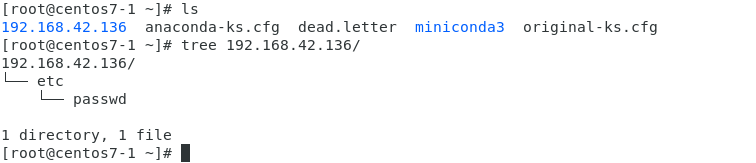
$ ansible server1 -m fetch -a "src=/etc/passwd dest=/root"
ansible會把/etc/passwd建立在root下面,root下面會有server1的IP資料夾,結構會長像是下面這樣
file module
file可以設定檔案的權限,刪除檔案,創建連結…
創建檔案並查看權限
$ ansible server1 -m shell -a "touch /tmp/test.txt"
$ ansible server1 -m shell -a "ls -l /tmp/test.txt"
修改檔案權限
$ ansible server1 -m file -a "path=/tmp/test.txt owner=user group=user mode=666"
重新查看檔案權限
$ ansible server1 -m shell -a "ls -l /tmp/test.txt"
刪除檔案
$ ansible server1 -m file -a "path=/tmp/test.txt state=absent"
創建資料夾並查看權限
# ansible server1 -m file -a "path=/tmp/testdir state=directory" # 可以使用file創建資料夾
$ ansible server1 -m command -a "mkdir -p /tmp/testdir"
$ ansible server1 -m command -a "ls -ld /tmp/testdir"
修改資料夾權限
$ ansible server1 -m file -a "path=/tmp/testdir mode=700"
刪除資料夾
$ ansible server1 -m file -a "path=/tmp/testdir state=absent"
建立軟連結並查看軟連結權限
$ ansible server1 -m file -a "src=/tmp/test.txt name=/root/1.txt state=link"
$ ansible server1 -m command -a "ls -l /root/1.txt"
service module
使用service開啟httpd server
$ ansible server1 -m service -a "name=httpd state=started"
測試有沒有成功
$ curl 192.168.42.136
把html丟到http伺服器上,並抓取內容
echo "hi" > /root/hi.htm
$ ansible server1 -m copy -a "src=/root/hi.htm dest=/var/www/html/hi.htm"
curl 192.168.42.136/hi.htm
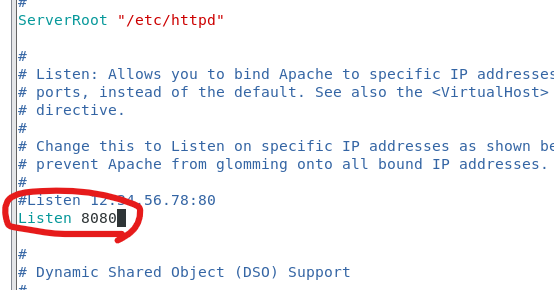
把httpd的80port改成8080
$ ansible server1 -m fetch -a "src=/etc/httpd/conf/httpd.conf dest=/root"
$ vim /root/192.168.42.136/etc/httpd/conf/httpd.conf  # IP位置會根據目標做改變
修改
Listen 8080
$ ansible server1 -m copy -a "src=/root/192.168.42.136/etc/httpd/conf/httpd.conf dest=/etc/httpd/conf/httpd.conf"
$ ansible server1 -m service -a "name=httpd state=restarted"
$ curl 192.168.42.136:8080/hi.htm
group module
使用group創建群組
$ ansible server1 -m group -a "name=testgroup"
刪除群組
$ ansible server1 -m group -a 'name=testgroup state=absent'
測試群組有沒有存在
$ ansible server1 -m command -a 'getent group testgroup'
user module
創建使用者 name: 使用者名稱,group: 使用者所屬group,uid: user id,comment: 註解,home: 家目錄
$ ansible server1 -m user -a 'name=testuser group=testgroup uid=1100 comment='peter' home=/home/testuser'
測試
$ ansible server1 -m command -a "id testuser"
# $ ansible server1 -m command -a 'getent passwd user'
刪除使用者
$ ansible server1 -m user -a 'name=testuser state=absent'
link_command
指令串接&&、||、;
前面; 後面
rpm -qa | grep httpd; rpm -qa | grep vsftp
&&: 前面失敗後面不會執行,前面成功後面才執行
|| : 前面成功後面執行,前面失敗後面執行
; : 前面後面都會執行